Why AI still can’t spell: the technical reason text in images goes wrong
Garbled lettering is not a maturity problem that the next model version will outgrow — it is a consequence of how image models are built, and it has a known workaround.
Of all AI-image defects, garbled text is the most public-facing: nobody has to zoom in to see that the billboard says “KODAK ROMTOE”. It is also the best understood. The research literature has diagnosed exactly why diffusion models misspell — twice over, in fact — and the diagnosis explains both why models keep improving and why the failure never fully goes away.
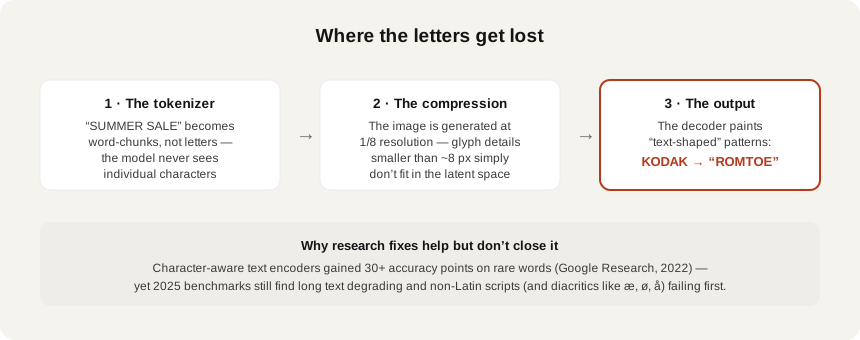
Failure one: the model never sees letters
Text prompts reach an image model as tokens — word and sub-word chunks, not characters. Gwern Branwen’s classic analysis of GPT-3 explains the mechanism: the model works with ~51k byte-pair encodings, so it is “unable to easily learn” what letters a word actually contains. Google Research made the image-side consequence precise in “Character-Aware Models Improve Visual Text Rendering”: popular text-to-image models are built on character-blind text encoders that receive no character-level information at all. The model knows what the word “SALE” means; it has never been told what it looks like, letter by letter.
The paper also proved the diagnosis by fixing it: swapping in character-aware encoders produced 30+ point accuracy gains on rare words. A whole research line followed — TextDiffuser and TextDiffuser-2 plan explicit text layouts before painting, AnyText feeds OCR-encoded glyph information into generation for multilingual text, Glyph-ByT5 aligns the encoder with actual glyphs. Every one of these works by giving the model the character information the base architecture withholds.
Failure two: the letters don’t fit in the canvas
The second cause is spatial. Latent diffusion models generate in a compressed space — typically 8× smaller in each dimension than the output image, as Bria’s VP of generative AI explains: detail smaller than about 8 pixels effectively does not exist while the image is being formed. Small type, thin strokes, and dense glyphs (a problem GlyphDraw documented for Chinese) are below the resolution at which the model thinks. The decoder then renders text-shaped texture where crisp glyphs should be.
This is why the failure is systematic, not random: big short headline words often survive; long strings, fine print and complex scripts degrade first. The STRICT benchmark (2025) stress-tested state-of-the-art models and found persistent failures on long text and instruction-following — with a clear script hierarchy: English renders best, Latin scripts with diacritics worse, Chinese worst. For a Danish marketer, that hierarchy has a very concrete meaning: æ, ø and å sit exactly in the danger zone.
What actually ships correct type
The professional workaround is simple and old-fashioned: don’t ask the model to typeset. Ideogram’s own prompting guide — the vendor most associated with text rendering — instructs users to quote desired text and concedes a typeface cannot be specified by name. Canva’s recommended flow generates the image, then adds text with its native type tools; the Adobe pattern is generative backgrounds plus real vector Type layers on top. Generated pixels for the scene, real typography for the words — every character guaranteed, any font, any language, æøå included.
And when generated text does ship — logos in the scene, packaging in the background, signage — it needs checking, because that is exactly where the public failures came from. Chekr’s text & typography check reads every piece of rendered text in a creative and flags garbled, invented or misspelled strings with a pinned region; try it on one image free — the billboard would have taken one scan to catch.
What to do about it
- Treat in-image text as a defect zone by architecture, not a bug the next model fixes: character-blind encoders and 8× latent compression are structural.
- Composite real typography over generated backgrounds for anything that must be spelled correctly — this is what the tool vendors themselves recommend.
- Non-English text fails first: diacritics (æ, ø, å) and non-Latin scripts sit lowest in the measured accuracy hierarchy.
- Zoom on every piece of rendered text before shipping — background signage and packaging are where garbled strings hide.
- Automate the check where volume is high: a scan reads all rendered text and pins what is wrong.
Sources
- Character-Aware Models Improve Visual Text Rendering — Google Research (arXiv)
- GPT-3 Creative Fiction — BPE analysis — Gwern Branwen
- TextDiffuser: Diffusion Models as Text Painters — Microsoft Research (arXiv)
- TextDiffuser-2 — Microsoft Research (arXiv)
- AnyText: Multilingual Visual Text Generation and Editing — Alibaba Group (arXiv)
- GlyphDraw — OPPO Research (arXiv)
- Glyph-ByT5: A Customized Text Encoder for Accurate Visual Text Rendering — Microsoft Research Asia (arXiv)
- UDiffText — Zhejiang University (arXiv)
- VAE: the latent bottleneck — why image generation loses fine details — Efrat Taig (Bria)
- STRICT: stress-testing text rendering in diffusion models — arXiv (EMNLP 2025)
- Ideogram prompting guide: text and typography — Ideogram
- Using Magic Media — Canva
- How to use generative AI in Photoshop — Dupple